Updates to Nexsyis & NexsyisNow
Nexsyis: Updates to the Nexsyis (Manual) Estimates
We’ve made enhancements to the Nexsyis Estimate feature (formerly known as "Manual Estimate") to improve clarity, consistency, and ease of use when building and presenting estimates.
What’s new:
Previously established estimate templates now appear as Tasks in the right-hand grid
When added to the estimate, each Task description is displayed as a header, with all related Items listed beneath it
Repair Procedures can be added to Tasks to explain the work being performed and display directly on the estimate/invoice
Tasks can be created in advance with pre-loaded items, pricing, notes, and attributes to speed up estimate creation
Attributes allow easier filtering when selecting Tasks
Estimate and Invoice print copies have been cleaned up and adjusted for a more polished, professional appearance
These updates help streamline estimate creation and present a more professional, easy-to-understand estimate for customers.

Please share this quick guide with any users who utilized the Nexsyis Manual Estimate feature; Quick User Guide to Nexsyis Estimate Changes
Full documentation on this feature and its setup can be found here: Nexsyis Estimates
NexsyisNow: New Work Order Features
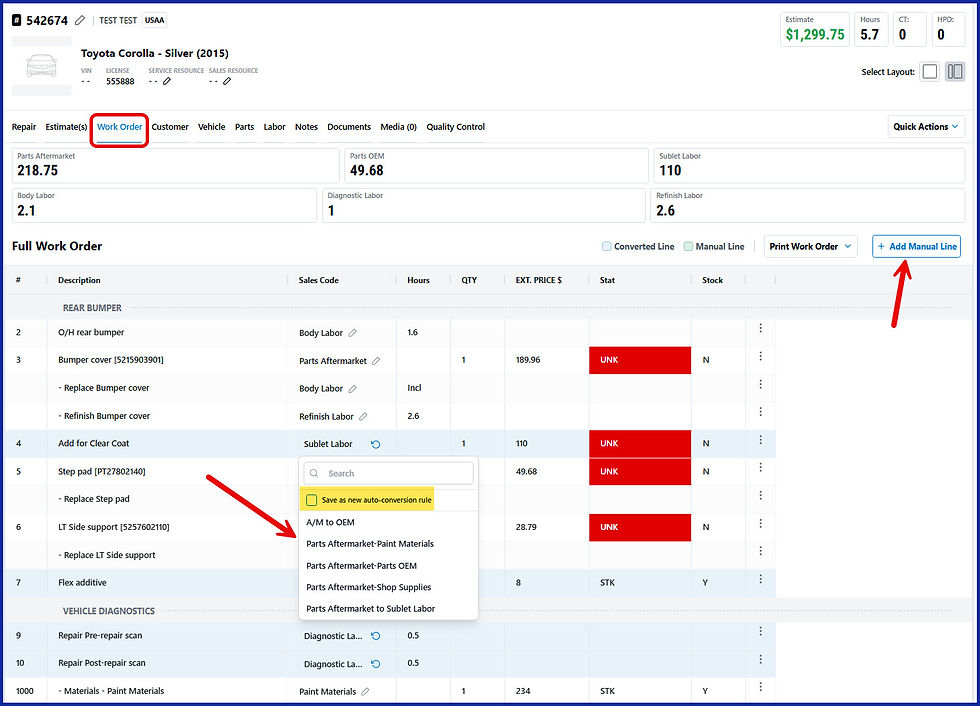
With the latest update, you can now perform the following actions on Work Orders in NexsyisNow:
Add a manual line
Delete a manual line
Convert a sales code
Create an Auto Line Conversion Rule when converting a sales code
Unconvert line
Add Note to line via the three-dot menu
More information regarding these new features can be found at the wiki here: