
Updates to NexsyisNow
- 4 days ago
- 1 min read
Updated: 3 days ago
Folder Notes
We have redesigned the Folder Notes feature in NexsyisNow. You can now add notes from wherever in the folder by selecting +Add Note in the panel on the left:

Select the Notes section to open the Folder Notes drawer to view all created notes. From there, you can perform the actions listed below:
Search notes by keyword, date, or user to quickly find what you need
Filter by category to view only the notes that matter to you
Copy notes to your clipboard or print all notes at once for easy sharing
Highlight individual notes using the star and toggle to view only your most important ones

For more information on Folder Notes in NexsyisNow, please review at the wiki here:
Favoriting Internal Contacts
You can now 'star' your most frequently contacted team members in the internal contact list in NexsyisNow. Once a team member is favorited, you can filter your contact list to "Favorites Only" when assigning tasks or sending team messages.
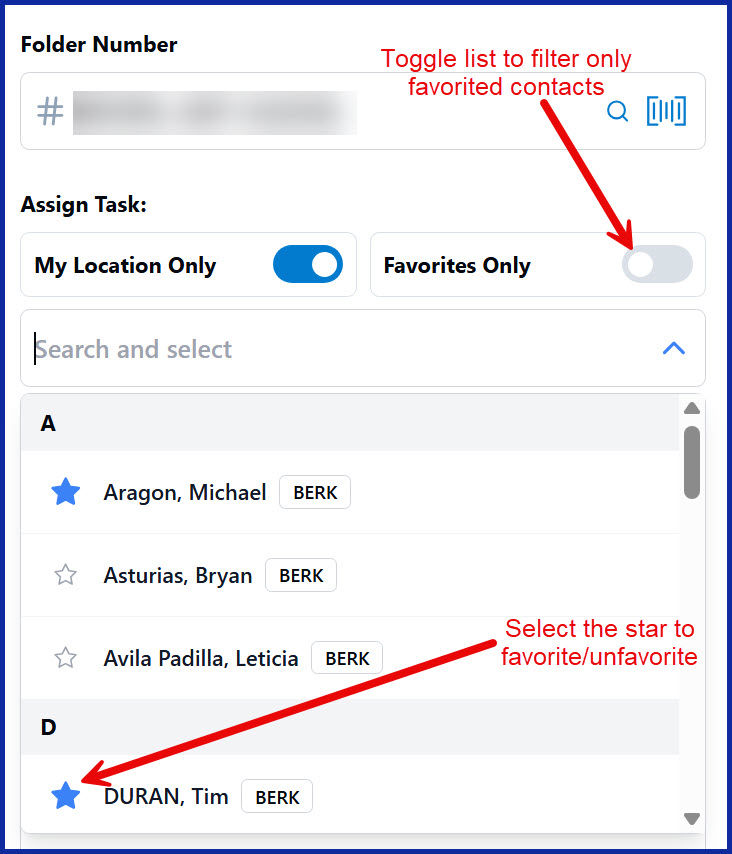
For more information on the newly added Tasks feature in NexsyisNow, please review at the link here: Tasks in NexsyisNow.


Comments